
Youth Sports Club Registration & Management Software
Youth sports club software for Canadian clubs: team and season registration, waivers and fees, equipment add-ons, and waitlists. A setup guide.
A youth sports club registers by season and by team, with tryouts, divisions, and equipment to sort out. Families often register more than one child and pick up gear or uniforms at the same time. Paper and email do not keep up with a registration window that opens to a few hundred families at once. The same setup works for soccer, hockey, basketball, gymnastics and swim clubs.
One link for every team
Each location of your club gets one registration link that lists every team with its age range and fee, so a parent can register the right child on the right team and pay in one go.
Capture the athlete and the essentials
- Athlete name, date of birth, and the division or team
- Guardian contacts and emergency contact
- Medical notes and any conditions a coach must know
- Prior experience or level, where it affects placement
Waivers, league fees, and equipment
Take payment at registration with everything bundled:
- Liability waiver e-signed in the flow, before payment
- Season or league fees, with an automatic sibling discount and early-bird pricing
- Equipment and uniform add-ons at checkout (Team plan and up)
- Tax at your provincial rate, with payments going to your own Stripe account
Waitlist full divisions
When a division fills, families join a waitlist. When a spot opens, it is offered to the next family in order.
Summer and holiday sports camps
Many clubs also run week-long camps in the summer and over school breaks. Set each week up as its own camp with an age range and a capacity, and families register for as many weeks as they want in one checkout. Coaches check athletes in at the field from the same list. See how it works for sports camp registration.
What parents see when registration opens
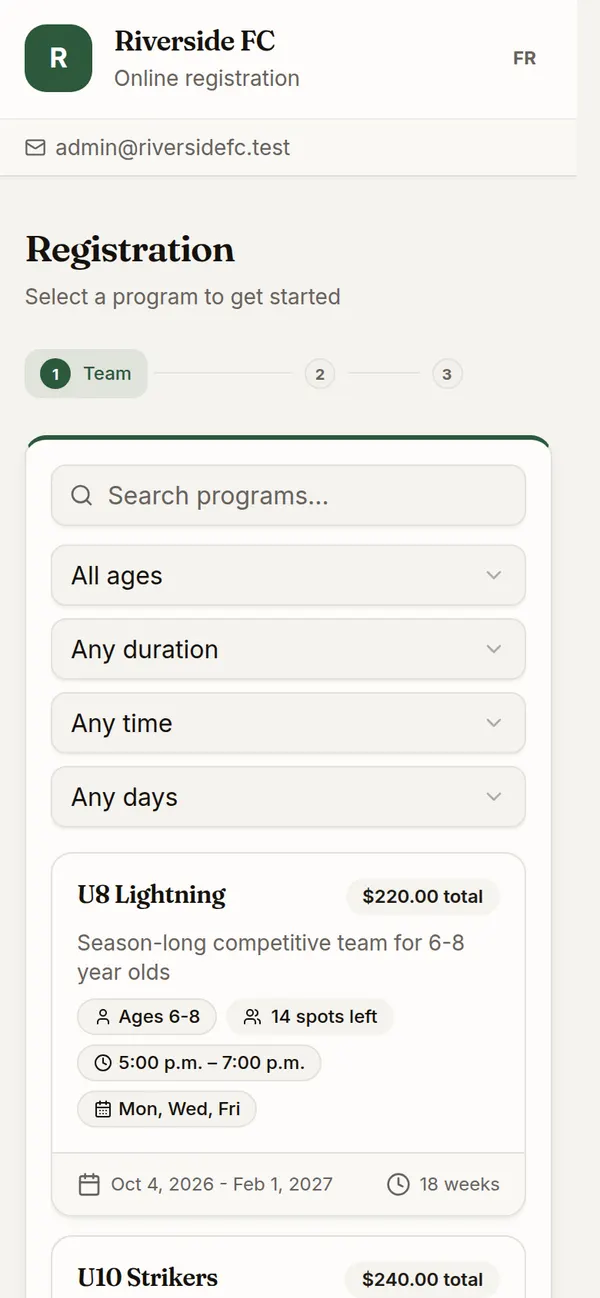
Parents open your club’s link on a phone and see every team with its ages, fee, practice days, and spots left. They pick a team, add the athlete, sign the waiver, and pay. A parent with two athletes adds both before paying once.
What your registrar sees
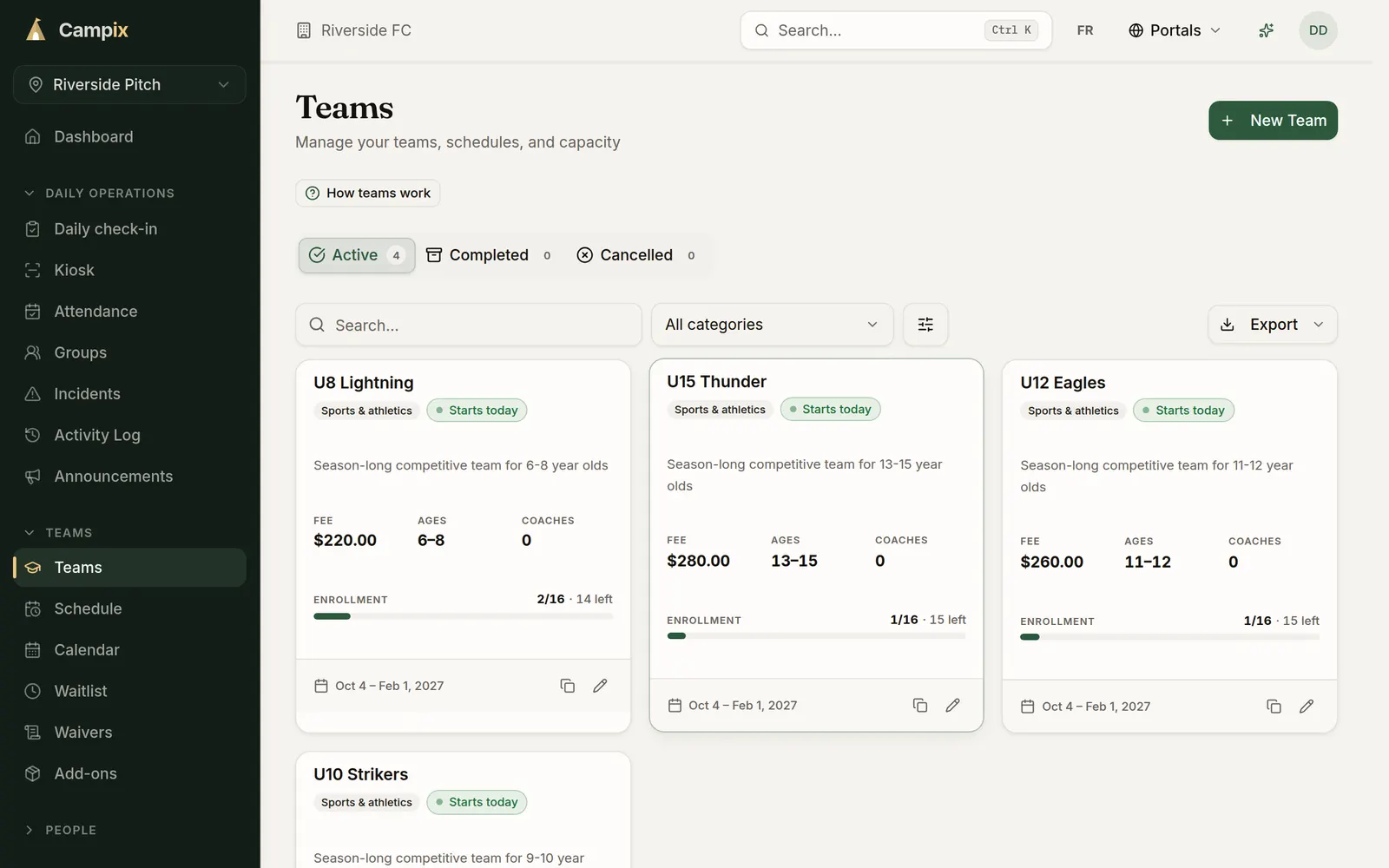
Each team shows its fee, age range, coaches, and how many spots are filled, so you see which divisions need a push and which need a waitlist. Export your roster and registrations to a spreadsheet for your league or association.
A sport registration tool compared with a spreadsheet
| Task | Online form and a spreadsheet | Online registration with Campix |
|---|---|---|
| Season signup | A form, then copying rows into a sheet | One link with every team, on any phone |
| Right division | Ages checked by hand | The date of birth is checked against the team’s age range |
| Waivers | A PDF sent by email | E-signed in the form, before payment |
| Fees | E-transfers chased one by one | Card payment at registration, with a sibling discount and an early-bird discount |
| Uniforms | A separate order form | Add-ons picked at checkout |
| Full teams | A pile of emails | A waitlist that offers the next family an open spot |
What it costs
Start on Solo for free and move up when you add teams or fields. Prices are in Canadian dollars.
| Plan | Price (CAD) | Fee on online payments | Sites | Programs | Participants |
|---|---|---|---|---|---|
| Solo | Free | 2% | 1 | 3 | 100 |
| Team | $79 a month | 1.5% | 2 | 10 | 500 |
| Multi-site | $149 a month | 1% | 5 | 25 | 3,000 |
| Network | Custom pricing | 0.5% | Unlimited | Unlimited | Unlimited |
Every new organization starts with a 30-day Team trial, with no credit card. Stripe’s card processing fee comes on top of the platform fee, and you can pass it on to families.
What good looks like
A parent registers two athletes in the right divisions, signs waivers, adds a uniform, pays, and is confirmed in minutes. Start free or see plans and pricing.
More on registration
Common questions
Can a parent register more than one athlete at once?
Yes. A parent adds each athlete, then pays once for all of them.
Does it check the athlete's age against the team?
Yes. The form compares the date of birth with the team's age range and stops a registration that does not fit.
Can I sell uniforms and equipment at registration?
Yes, on the Team plan and up. Add them as add-ons and parents pick them at checkout.
Can I offer a sibling discount or an early-bird discount?
Yes. Turn on the sibling discount in Settings and set an early-bird discount on each team.
Do you take a fee on payments?
Yes. Online payments carry a platform fee of 0.5% to 2%, depending on the plan, plus Stripe's card processing fee. Payments go to your own Stripe account.
Is it available in French?
Yes. The registration page, the family portal, and the emails families receive are in English and French.
Run your camp on Campix
Online registration, waivers, payments, and phone-friendly check-in, built for day camps, after-school programs, and youth sports. Start free, no card required.