
Jumbula Alternative for Camps and After-School Programs
Moving camps or after-school programs off Jumbula? Compare features, then switch registration safely: data export, payments, tax, and a season checklist.
Jumbula handles camp and class registration for many programs. If you have weighed your options and want to switch, the move is mostly an export and a careful import.
Decide what has to come across
You do not need your whole history in the new system. Bring the data next season runs on:
- Families and contact details
- Participants, with dates of birth and medical notes
- Your programs, so you can set up next season
- A list of outstanding balances, to collect before you switch
Export, then map before you import
Export from Jumbula as a spreadsheet while your account is still active. On the Import screen, Campix matches common column names, checks every row, and shows how many will be added, skipped or need fixing before anything is saved. Import participants and programs, then have families register for next season on your new link.
Payments, payouts, and provincial tax
Confirm how money moves. With Campix each location connects its own Stripe account, and Stripe pays each payment out to your bank 14 days after it is made, in a daily payout. Set your provincial tax rate, and turn on the sibling discount and early-bird pricing you already offer, so families see the discounts they expect.
A season-safe switch checklist
- Export families, participants and programs from Jumbula
- Import participants and programs on the Import screen, then check a few rows
- Set up sessions, prices, and taxes
- Connect Stripe per location and run one test payment
- Recreate waivers and consent forms
- Open registration for next season and send families the new link
- Keep your final Jumbula export as an archive
Features side by side
The Jumbula column comes from Jumbula’s own public pages, checked in October 2026. Where those pages do not mention something, the table says so. Ask Jumbula about anything marked not listed.
| Feature | Campix | Jumbula, per its public pages |
|---|---|---|
| Registration forms | Your own questions on each program | Customizable registration forms |
| Online payments | Stripe, paid into each location’s own account | Stripe and PayPal |
| Waivers | E-signed in the registration form, before payment | Custom online forms and waivers |
| Attendance | Daily roster, QR kiosk (Team and up), and pickup checks against authorized names | Attendance tracking, including punch cards |
| Family access | No account: families sign in to the family portal with a code sent to their email | A Jumbula account portal for each user |
| Mobile apps | None: registration and the family portal run in the phone’s browser | A business app for staff and a family app |
| Messages to families | Email announcements (Team and up) | Email and SMS marketing |
| French | Registration page, family portal, and family emails in English and French | Not listed |
| Canadian sales tax | Your provincial rate, set per location | Not listed |
If you run after-school programs
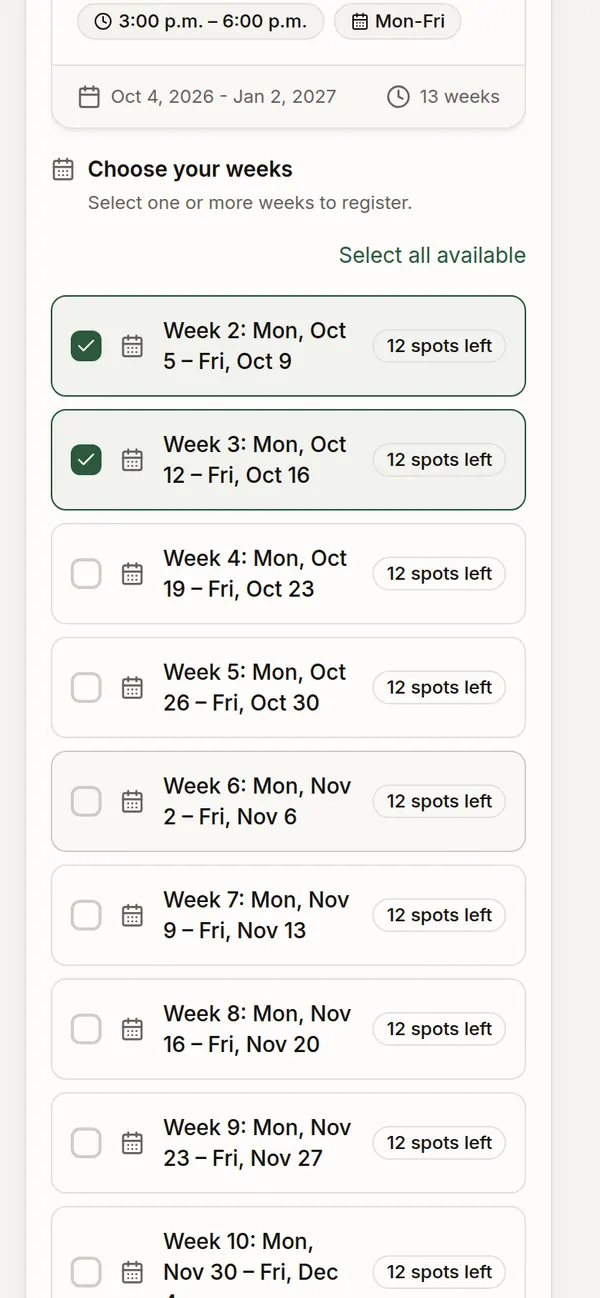
After-school care runs every day, so set up two things before families register. Set a weekly price so families pay only for the weeks they need, and turn on Require authorized pickup names so the form asks who may pick each child up. Families download payment receipts from the family portal at tax time. Our after-school registration guide covers the setup in detail.
What Campix costs
| Plan | Price (CAD) | Fee on online payments | Sites | Programs | Participants |
|---|---|---|---|---|---|
| Solo | Free | 2% | 1 | 3 | 100 |
| Team | $79 a month | 1.5% | 2 | 10 | 500 |
| Multi-site | $149 a month | 1% | 5 | 25 | 3,000 |
| Network | Custom pricing | 0.5% | Unlimited | Unlimited | Unlimited |
Every new organization starts with a 30-day Team trial, with no credit card. Stripe’s card processing fee comes on top of the platform fee, and you can pass it on to families.
Pick the off-season to move
The quiet window between sessions is the safe time to switch, set up, and test before families see your new registration page. If you are still comparing options, our guide on choosing camp management software in Canada covers what to check first.
More on registration
Common questions
Can I bring my families over from Jumbula?
Yes. Export your families, participants and programs from Jumbula as a spreadsheet, then load them on the Import screen. Campix checks every row and shows how many will be added, skipped or need fixing before anything is saved.
Do parents need an account to register?
No. Parents register and pay through your link without creating an account. To come back later, they open the family portal and enter a code sent to their email.
Do you take a fee on payments?
Yes. Online payments carry a platform fee of 0.5% to 2%, depending on the plan, plus Stripe's card processing fee. Payments go to your own Stripe account.
Is it available in French?
Yes. The registration page, the family portal, and the emails families receive are in English and French.
Run your camp on Campix
Online registration, waivers, payments, and phone-friendly check-in, built for day camps, after-school programs, and youth sports. Start free, no card required.