
Daycare Registration System & Childcare Registration Software
How Canadian daycares take enrollment, manage daily attendance and pickups, give families receipts for tax time, and handle waitlists. A guide for operators.
A daycare runs every day, under a licence, with a set number of spots. Three things matter most: who can pick a child up, whether the family can claim the fees at tax time, and how you manage a waitlist for a full room. Settle all three at enrollment.
One enrollment link per location
Each centre should have its own link showing its rooms, hours, and pricing, so the right schedule and taxes apply. Set up each room for the full term, or price it by the week so families pick only the weeks they need.
Capture the child and every authorized pickup
- Child name, date of birth, and the room or program
- Guardian contacts and emergency contact
- Every person allowed to pick the child up
- Allergies, medications, and medical notes staff need daily
- Any accessibility needs
Turn on Require authorized pickup names in Settings and the form asks each family for up to 10 people allowed to pick their child up. The names go on the child’s profile, so staff check them at the door. You can also require a pickup PIN or a signature.
Payment receipts for tax time
Families can claim daycare fees as child care expenses, and they need a receipt to do it. They download a payment receipt from the family portal for each paid registration. It shows the child’s name, the amount, the dates, and your Business Number if you add it in Settings. For Canadian day camps, daycares, and after-school programs, it also notes that the fees can be claimed on line 21400.
Waitlist full rooms in order
Your licence ratios set how many children each room can take. A waitlist captures the families you cannot place yet and, when a spot opens, offers it to the next family in order. It also shows you where demand is heaviest for planning.
What families see on their phone
Families open your link on a phone, pick a room, and choose the weeks they need. Each room shows the ages, hours, days, weekly price, and spots left, so nobody asks for a place you do not have.
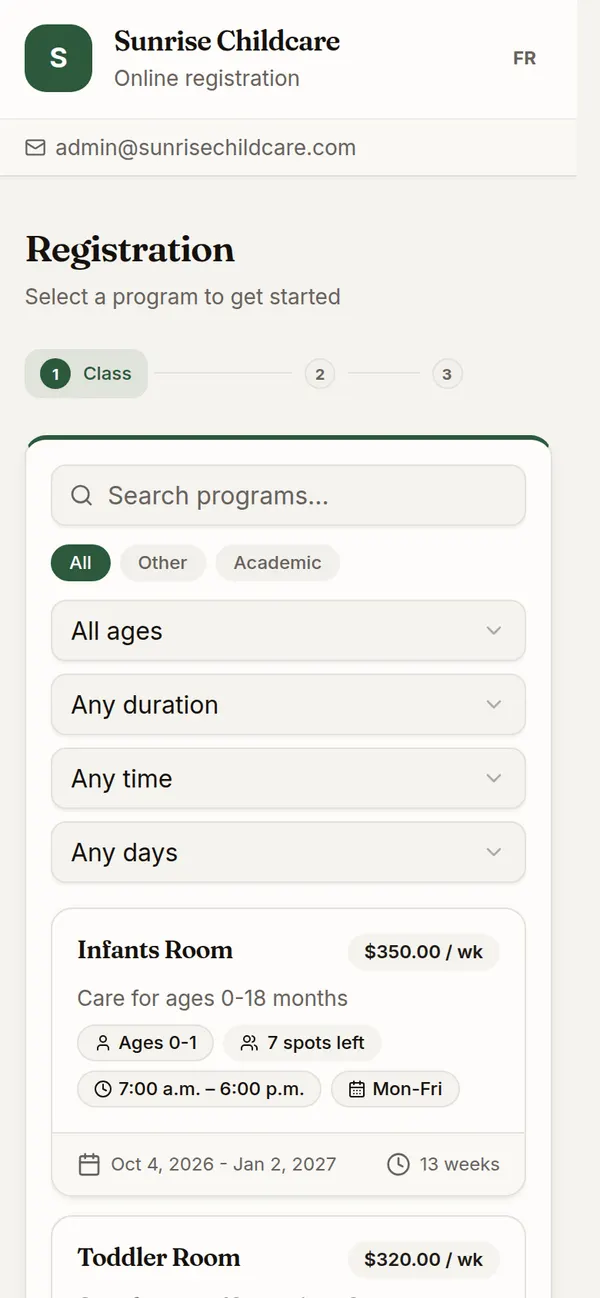
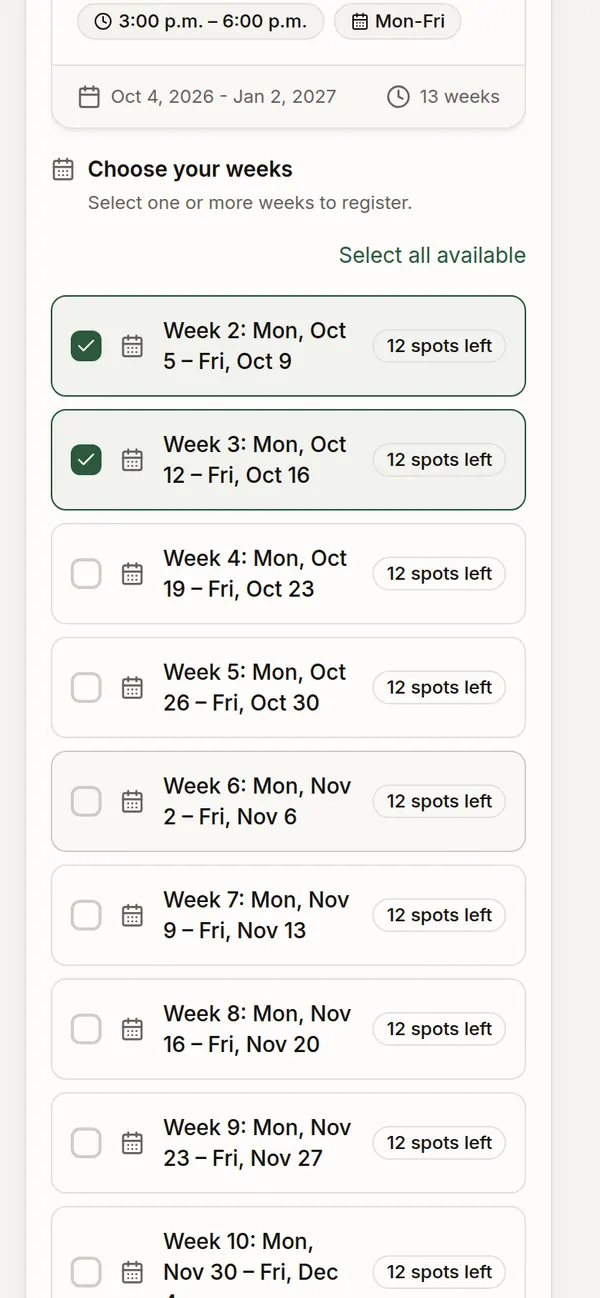
Parents do not create an account. They fill in the child, the guardians, the emergency contact and medical notes, sign what you require, and pay by card. To come back later, they open the family portal and enter a code sent to their email.
What your staff see
Every registration lands on the Registrations screen, by child and class. Filter by class, export the list to a spreadsheet, or open a child to see allergies, authorized pickups, and emergency contacts.
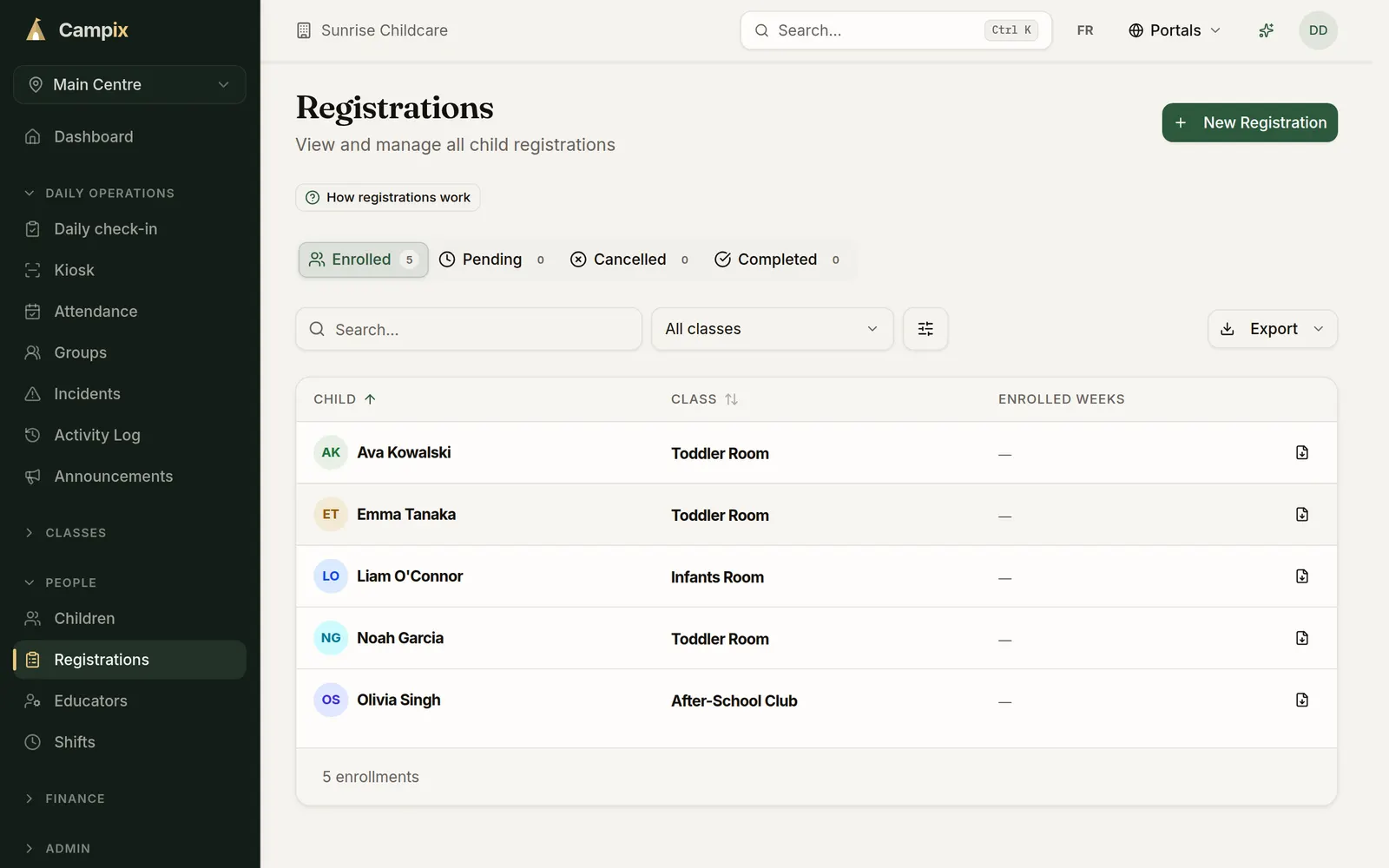
A daycare registration system compared with paper forms
| Task | Paper forms and email | Online registration with Campix |
|---|---|---|
| Enrollment | Forms re-typed into a spreadsheet | Families fill in the form once, on their phone |
| Room capacity | Counted by hand | Spots left on each room, and a full room offers the waitlist |
| Pickups | A paper list at the door | Names on the child’s profile, checked at pickup |
| Payment | E-transfers matched by hand | Card payment at registration, paid into your own Stripe account |
| Waitlist | Names in an inbox | The next family is offered the spot when one opens |
| Receipts | Written up in January | Families download them from the family portal |
What it costs
Start on Solo for free and move up when you add rooms or sites. Prices are in Canadian dollars.
| Plan | Price (CAD) | Fee on online payments | Sites | Programs | Participants |
|---|---|---|---|---|---|
| Solo | Free | 2% | 1 | 3 | 100 |
| Team | $79 a month | 1.5% | 2 | 10 | 500 |
| Multi-site | $149 a month | 1% | 5 | 25 | 3,000 |
| Network | Custom pricing | 0.5% | Unlimited | Unlimited | Unlimited |
Every new organization starts with a 30-day Team trial, with no credit card. Stripe’s card processing fee comes on top of the platform fee, and you can pass it on to families.
What good looks like
A family enrolls, names their pickups, signs consent, pays, and can download a receipt whenever they need it. Start free or see plans and pricing.
More on registration
Common questions
Do parents need an account to register?
No. Parents register and pay through your link without creating an account. To come back later, they open the family portal and enter a code sent to their email.
Can I charge by the week?
Yes. Set a weekly price on a room and families choose the weeks they need, paying for those weeks at registration.
Can families say who may pick their child up?
Yes. Turn on Require authorized pickup names in Settings and the form asks for up to 10 people. Staff see the names on the child's profile at pickup.
Do you take a fee on payments?
Yes. Online payments carry a platform fee of 0.5% to 2%, depending on the plan, plus Stripe's card processing fee. Payments go to your own Stripe account.
Is it available in French?
Yes. The registration page, the family portal, and the emails families receive are in English and French.
Can I run more than one centre?
Yes. Each centre gets its own link, rooms, and prices. Team covers 2 sites and Multi-site covers 5.
Run your camp on Campix
Online registration, waivers, payments, and phone-friendly check-in, built for day camps, after-school programs, and youth sports. Start free, no card required.